Andrew Dorokhov
In WordPress, we can use the built-in WP-Cron system to schedule and execute tasks at specific intervals. WP-Cron allows us to schedule tasks without relying on the server’s cron scheduler directly. Instead, WordPress handles the scheduling internally.
The mechanism is simple: on every page load WordPress checks the list of scheduled tasks to see what needs to be run. This is also its main weakness — on a site with no traffic nothing gets executed, which is why a real system cron job is the more reliable setup.
Configuration
Prevent WP-Cron from running on every request by adding the following to wp-config.php:
define('DISABLE_WP_CRON', true);
Instead of this we can set up a system-level cron job to execute wp-cron.php periodically. For example:
*/5 * * * * php /path-to-your-site/wp-cron.php
WordPress Cron Event Hooks and Descriptions
| Event Hook | Description |
|---|---|
wp_version_check |
Checks for WordPress core updates twice a day. |
wp_update_plugins |
Checks for plugin updates twice a day. |
wp_update_themes |
Checks for theme updates twice a day. |
wp_scheduled_delete |
Deletes trash for posts and comments once a day. |
delete_expired_transients |
Clears expired transients once a day. |
wp_scheduled_auto_draft_delete |
Deletes auto-draft posts once a day. |
wp_privacy_delete_old_export_files |
Deletes old export files once a day. |
wp_site_health_scheduled_check |
Checks and updates the site health status once a week. |
wp_https_detection |
Checks if HTTPS is supported on the site twice a day. |
Adding the Hook
add_action('my_hourly_task', 'my_hourly_function');
Schedule a Recurring Event
wp_schedule_event( $timestamp, $recurrence, $hook );

// $timestamp  - the starting point from which the hook begins to work.
// $recurrence - how often the action should repeat: hourly, twicedaily, daily
//               (plus weekly since WP 5.4, and any custom interval you register).
// $hook       - the name of the hook.
wp_next_scheduled() takes the name of the hook and returns either the timestamp of the next execution or
false, meaning the task is not scheduled. Checking it first prevents the same event from being queued
twice:
if ( ! wp_next_scheduled( 'my_hourly_task' ) ) {
    wp_schedule_event( time(), 'hourly', 'my_hourly_task' );
}
Schedule a one time event
if ( ! wp_next_scheduled( 'custom_one_time_cron' ) ) {
    wp_schedule_single_event( $timestamp, 'custom_one_time_cron' );
}
Unscheduling tasks
register_deactivation_hook( __FILE__, 'bl_deactivate' );

function bl_deactivate() {
    $timestamp = wp_next_scheduled( 'bl_cron_hook' );
    wp_unschedule_event( $timestamp, 'bl_cron_hook' );
}
More easy way:
// Unschedules all events attached to the hook with the specified arguments.
wp_clear_scheduled_hook( 'bl_cron_hook' );
Add Custom Cron Interval
WordPress doesn’t have a built-in interval for monthly execution, so you need to add a custom interval for a month.
You can do this using the cron_schedules filter.
Add this code to your theme’s functions.php file or a custom plugin:
add_filter('cron_schedules', 'custom_monthly_cron_schedule');
function custom_monthly_cron_schedule($schedules) {
    $schedules['monthly'] = array(
        'interval' => 30 * 24 * 60 * 60, // 30 days in seconds
        'display' => __('Once Monthly')
    );
    return $schedules;
}
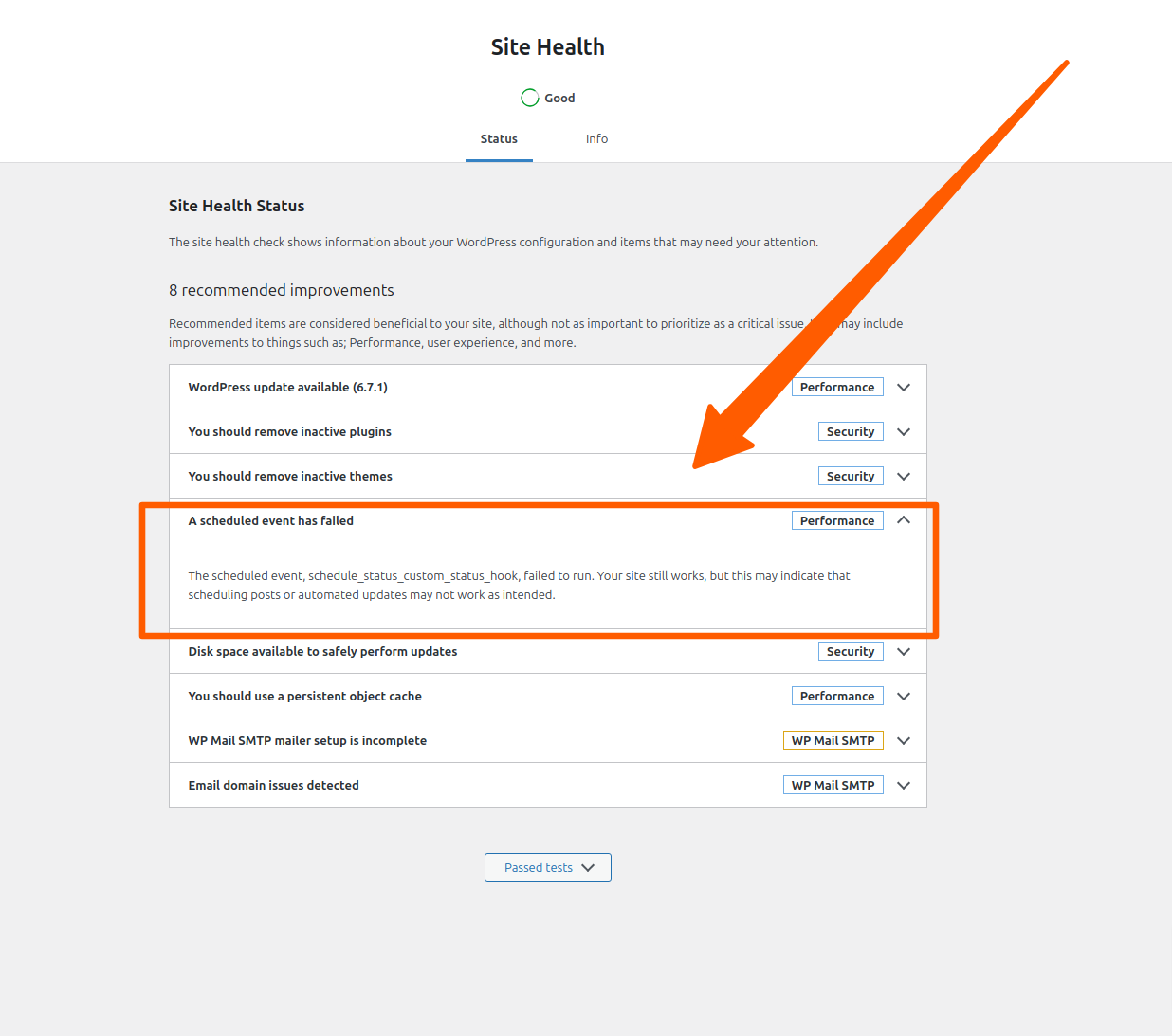
Diagnostics of issues
Tools -> Site health.