
 Andrew Dorokhov
Bitcoin Core is a full Bitcoin client and builds the backbone of the network. It offers high levels of security, privacy, and stability. It is a direct descendant of the original Bitcoin software client released by Satoshi Nakamoto after he published the famous Bitcoin whitepaper.
Official website: open_in_new https://bitcoincore.org
Tarball with the client for Linux (bitcoin-22.0-x86_64-linux-gnu.tar.gz) takes 35.8 Mb.
If we take a look inside the archive (in bitcoin-22.0/bin), we will see the next picture:
total 81472
-rwxr-xr-x 1 andrew andrew  2157888 Sep  8 21:15 bitcoin-cli
-rwxr-xr-x 1 andrew andrew 12920800 Sep  8 21:15 bitcoind
-rwxr-xr-x 1 andrew andrew 35541656 Sep  8 21:15 bitcoin-qt
-rwxr-xr-x 1 andrew andrew  2780256 Sep  8 21:15 bitcoin-tx
-rwxr-xr-x 1 andrew andrew  1960736 Sep  8 21:15 bitcoin-util
-rwxr-xr-x 1 andrew andrew  7537440 Sep  8 21:15 bitcoin-wallet
-rwxr-xr-x 1 andrew andrew 20516256 Sep  8 21:15 test_bitcoin
Now in more detail about each file:
bitcoind— the main Bitcoin Core app, runs as a daemon.bitcoin-cli— CLI client to talk to the daemon.bitcoin-qt— the graphical Bitcoin Core client.
There are two variations of the original bitcoin program available; one with a graphical user interface, and a ‘headless’ version (called bitcoind).
They are completely compatible with each other, and take the same command-line arguments, read the same configuration file, and read and write the same data files.
You can run one copy of either bitcoin-qt or bitcoind on your system at a time (if you accidentally try to launch another, the copy will let you know that bitcoin-qt or bitcoind
is already running and will exit).
After starting bitcoin-qt you may see something like this:
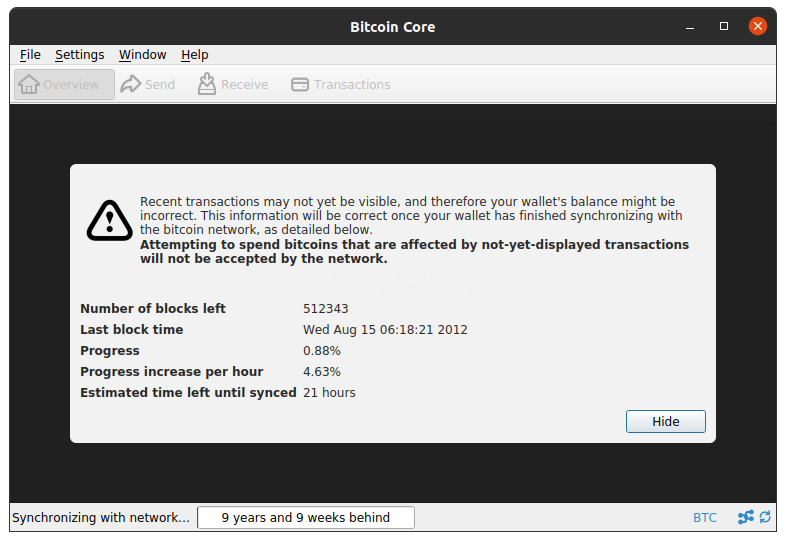
That is the initial blockchain sync. You can pause the download by disabling network activity (button in the lower-right corner of the window). A full chain needs about 340 GB of free disk space.
The Bitcoin client talks to the network on port 8333.
Under Window → Information you can see the current block height, where the blockchain lives on disk, and more.
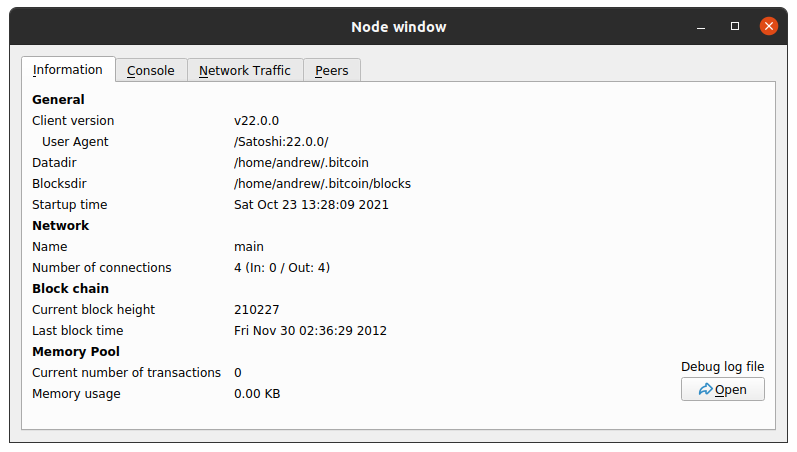
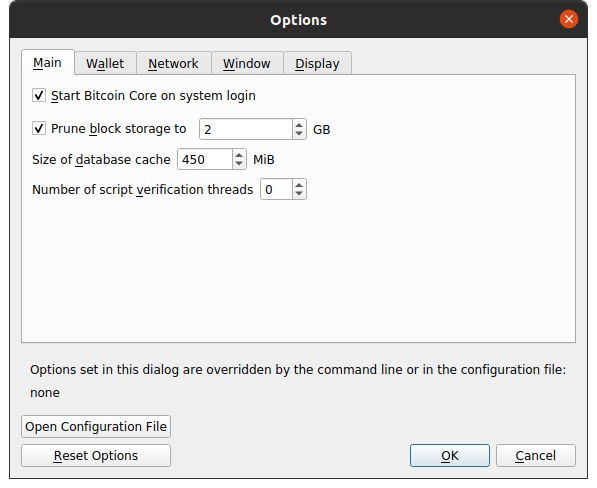
It is possible to configure the node to run in pruned mode in order to reduce storage requirements.
This can reduce the disk usage from over 350 GB to around 1 GB.
Just open Settings → Options and set the Prune block storage to field.
Configuration
Note that bitcoind and bitcoin-qt can use different configuration paths in some setups, so options set only in the GUI may not apply when you start bitcoind.
Bitcoin Core stores settings in ~/.bitcoin/bitcoin.conf. Values in that file override what you set in the bitcoin-qt GUI.
Sample open_in_new bitcoin.conf .
Daemon commands
bitcoind -daemon — run in the background as a daemon.
Client commands
Bitcoin Core exposes a JSON-RPC interface. You reach it with the bitcoin-cli command-line tool.
bitcoin-cli help — list available commands.
bitcoin-cli -getinfo — status of this node and its blockchain database.
{
  "version": 220000,
  "blocks": 707160,
  "headers": 707161,
  "verificationprogress": 0.9999969037907491,
  "timeoffset": 0,
  "connections": {
    "in": 0,
    "out": 10,
    "total": 10
  },
  "proxy": "",
  "difficulty": 20082460130830.84,
  "chain": "main",
  "relayfee": 0.00001000,
  "warnings": ""
}